
Free experience
Create your first batch
0 VND
Ongoing basic experience
- 30 production credits per calendar month
- 1 editable project · 1 member
- 720p output · Up to 60 seconds per video
- No payment or card required for basic access

Spend your time on ideas. Let SuperCut handle the repetition.
Produce short videos in batches and prepare content for multiple TikTok accounts.
Assume 500 average views per video on the day of posting, with 10 videos per account per day.
10 videos per day
5,000views/day (modeled)100 videos per day
50,000views/day (modeled)1,000 videos per day
500,000views/day (modeled)An illustrative model, not a traffic promise. 500 is not a minimum. It assumes all content can be published and average performance holds as volume grows. Views are not unique viewers; 100 accounts is not a validated product capacity.
At an assumed 1% hit probability, 1,000 videos have an expected 10 hits.
A probability example, not 10 guaranteed daily hits. Use the same hit threshold and observation window for each video, such as seven days after posting.
One brand. Different content. Multiple highly liked videos. More ways for a product to be seen.












Heart counts are likes, not views. Selected public TikTok content, captured October 19, 2026. Highly liked examples do not represent typical results.
Search a brand name to see related accounts across markets and stores.
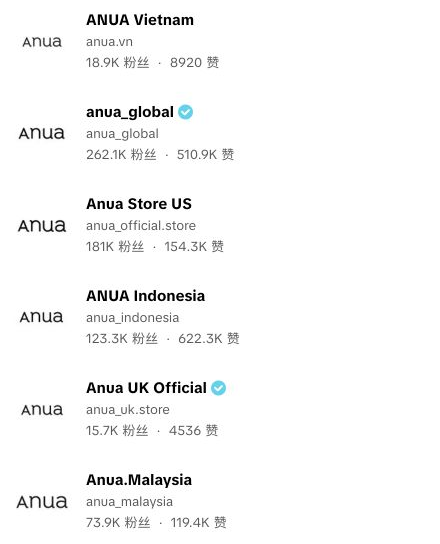
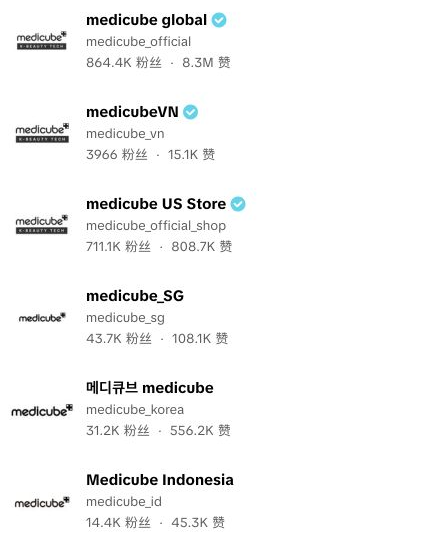
Original user-search screenshots. Ownership has not been verified for every account; common operation is not established.
Hundreds of daily videos require sustained production.
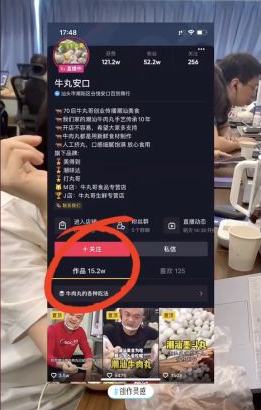

Niuwan Ankou · Historical Douyin example
152,000 accumulated posts ÷ 437 days
A historical daily average estimated by a 2021 case-video author from accumulated posts, not a day-by-day log.
View source video · September 1, 2021The Douyin figure is a third-party historical estimate; August’s figure is self-reported. Neither was audited day by day or establishes current frequency or platform limits.
Turn repetitive edits into batch production. Prepare content for multiple accounts in one workflow.
Combine footage by scene, preview variations, then render your videos.
Spend less time finding files and repeating steps, and more time on content.
Organize account details, content plans and manual publishing records in one place.
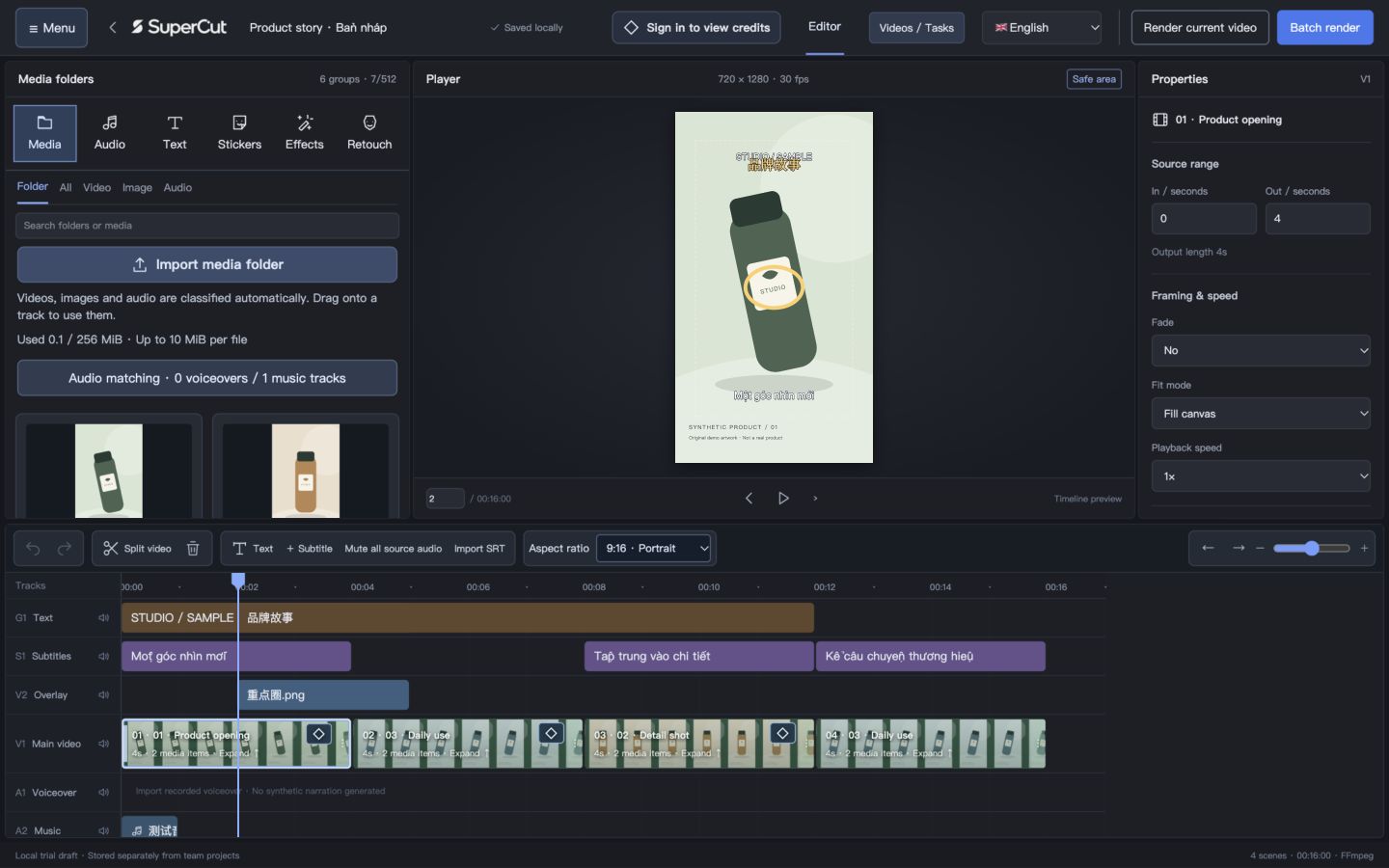
Currently supports content production and manual publishing workflows. Official production TikTok autopublishing is not yet available.
From source media to finished videos and a publishing plan across accounts.
Organize opening, detail and context media into scene alternatives.
Pick clips in scene order and assemble 6 example videos.
Assign different videos to accounts A, B and C by content focus.
Videos enter each account’s queue; live publishing awaits official integration.
A graphic workflow illustration, not live tasks. Batch production and manual records are available; official batch publishing awaits approval, account authorization and integration testing.
Explore the account workflowWho owns it, what to post, when to post, and how it performs.
Connect your accounts through one workflow.
Group by brand, market and content focus. Assign an owner before assigning content.
Swipe horizontally to see the full table
| Account role (example) | Content focus | Owner | Official connection |
|---|---|---|---|
| Brand channel | Brand stories and product introductions | Editor A | Not connected |
| Product demo channel | Feature demos and common questions | Editor A | Not connected |
| Use-case channel | Use cases for different audiences | Editor B | Not connected |
After integration: account owners authorize through TikTok; show real connection status and granted permissions.
Choose topics for each account, produce in batches, then review the results. Give each account its own content focus.



AI product images illustrate planning only, not published videos or customer results.
Content production does not need to wait for an API. Prepare topics, versions and reviews before planning publication.
Assign videos to the right accounts, review captions and publishing settings, then confirm the plan.
Swipe horizontally to see the full table
| Planned time | Account role (example) | Video | Status |
|---|---|---|---|
| 18:00 | Brand channel | demo-01.mp4 | Schedule draft |
| 19:00 | Product demo channel | demo-02.mp4 | Schedule draft |
| 20:00 | Use-case channel | demo-03.mp4 | Schedule draft |
Example plan · Asia/Ho_Chi_Minh (UTC+7) · Not submitted
Now: local videos + manual publishing records
After integration: add upload/direct posting, status updates and error handling within approved and user-granted permissions. Uploaded does not mean published.
Review results by account and content version to choose which hooks, benefits and use cases to test next.
Feedback can be reviewed manually today. Reading videos and available metrics automatically needs separate data permissions; this template contains no performance results.
Account roles, media organization, batch production, review, schedule preparation and manual records.
Official account connections, authorized publishing, posting status and video data. Availability depends on approval, user consent and real integration tests.
This website template does not connect real accounts or send videos. Scheduled automatic execution requires separate runtime and publishing-flow acceptance.
Official TikTok integration docsStart with the free experience. Upgrade when you need more production credits and collaboration.
Launch pricing · Monthly or six-month billing · Contact us on Zalo
Browse all 6 options horizontally
Create your first batch
For ongoing content production
For ongoing content production
For coordinated teamwork
For coordinated teamwork
Add capacity when you need it
Get six months for the price of five. Credits are issued per service month, expire with that period and do not roll over.
Free: 30 credits per Vietnam calendar month; paid credits are issued per service month. Credits count successfully generated and settled videos. Automated registration and payment are not available yet.
One successfully generated and settled video uses one production credit. Editing, previewing, saving drafts and viewing existing videos do not use production credits.
Top-up: 199,000 VND / 1,000 credits
Included credits expire at the end of the service period and do not roll over. A 1,000-credit top-up costs 199,000 VND and is valid for 365 days after verified crediting; it does not extend membership. Cloud AI and voice services are separate; official TikTok auto-publishing is not available yet.
Organize footage, make videos and prepare your next batch on your computer.
macOS installer
Public installer not releasedSupported chips, OS versions and installation instructions will be listed at release.
Windows installer
Public installer not releasedWindows still needs validation; system requirements and an installer will follow acceptance.
This is a download template. Release versions, change notes and file verification details will be added with public installers.
Ask about video creation, credits and accounts. For personal help, choose Zalo.
Contact us for help using SuperCut or choosing a plan.
Select below to contact our support teamAnswers from platform rules
Hello! Ask about batch creation, credits or publishing. Choose a question or type below.
Current defaults: 30 credits per Vietnam calendar month, 1 editable project, 1 member, 720p and up to 60 seconds per video. At launch, the entitlements shown in your account apply. Free access does not require payment.
Source: Platform usage rulesImport media folders → drag them into V1 scenes in order → preview combinations and adjust audio → confirm quantity and credits → generate in batches → view in My Works. Importing does not automatically arrange the timeline; each scene selects from its candidate media.
Source: Platform usage rulesThe current batch limit is 100 videos, subject to available media combinations, credits and account entitlements. This is not a completion-time guarantee; speed depends on media, effects and your computer.
Source: Platform usage rulesEach successfully generated, validated and settled video uses 1 credit. Credits are reserved before work starts; a reservation is not a charge. Importing, editing, previewing and saving drafts do not use creation credits. Cloud AI services, when available, have separate allowances and pricing.
Source: Platform usage rulesReservations are released for confirmed failed or cancelled items that have not settled successfully. Successfully settled videos remain charged. If a network interruption leaves results unverified, reconnect for reconciliation; a pending check is not a confirmed refund.
Source: Platform usage rulesReopening or downloading the same settled work does not cost another credit. Generating again after changing content, aspect ratio or resolution is a new task. Re-encoding a deleted finished file also counts as new generation.
Source: Platform usage rulesFree credits expire at the end of the Vietnam calendar month; membership credits expire at the end of their service period. Purchased credits follow the order validity, currently defaulting to 365 days after verified crediting. Buying credits does not extend membership. The earliest-expiring credits are used first.
Source: Platform usage rulesOfficial TikTok batch publishing is not available yet. You can create videos, plan content and record manual publishing; the website animation illustrates the workflow. Live publishing requires official integration, account authorization and completed validation.
Source: Platform usage rulesYou can organize information and content plans for multiple authorized accounts. Live account and publishing limits depend on platform permissions, entitlements and validation. The website’s 100-account example is a calculation scenario, not verified operating capacity.
Source: Platform usage rulesNo. Website traffic calculations use assumptions, and industry examples are not promises of SuperCut customer results. Batch creation increases opportunities to test content; results depend on content, products, audiences and platform distribution.
Source: Platform usage rulesThe Download section will provide official installers. Public downloads are not open yet: the macOS distribution package is pending and Windows has not been validated. Contact support on Zalo about trial availability.
Source: Platform usage rulesCreator: 299,000 VND/service month with 1,000 credits, 10 projects and 1 member. Team: 799,000 VND/service month with 5,000 credits, 50 projects and 5 members. Paid plans offer 1080p, up to 60 seconds and up to 100 videos per batch. A 1,000-credit top-up costs 199,000 VND. Included credits expire at period end; top-ups last 365 days after verified crediting. Contact Zalo about activation; online ordering and payment are not available yet. Cloud AI and voice are separate; TikTok auto-publishing is pending. Six-month billing: Creator 1,495,000 VND; Team 3,995,000 VND upfront, saving one month. Credits are still issued monthly and expire with each service period; the full six-month allowance is not issued upfront.
Source: Platform usage rulesContact support on Zalo with your order number and issue; do not send passwords or verification codes. Refund review considers the service period, used credits and pending tasks under the order terms. The assistant cannot verify payment, change balances or issue refunds.
Source: Platform usage rulesYou can edit local drafts and view finished files already on your computer. Starting new generation requires login and a network check of entitlements and credits. A network interruption may leave work awaiting settlement; keep media and results, reconnect and check before creating duplicate tasks.
Source: Platform usage rulesImporting media is not a cloud upload. Keep your media, drafts and locally generated files safe; account and task service data are managed separately. Do not move or delete source media while generating, and back up important projects.
Source: Platform usage rulesSelect the Zalo icon below to open the support contact. Depending on your device, Zalo may ask you to sign in or open its app. You send your question after opening the conversation.
Source: Platform usage rulesHello! Ask about batch creation, credits or publishing. Choose a question or type below.
I could not find a clear answer. Try rephrasing or contact support on Zalo. This assistant cannot look up orders or change balances.
Which of these questions do you mean?
Source: Platform usage rules
Zalo support0339380097Use SuperCut to put your team’s time where it matters.
Find my planLaunch plans announced · Installers and online payment are being prepared